1. About 3FPROJECT Simulator
PURPOSE
-
1
To provide an educational example for PRINCE2 training participants who still do not fully understand how the PRINCE2 Framework works in managing projects.
-
2
To provide examples using very simple process simulations to help students understand how to use and how the PRINCE2 Framework works.
Intended Audience (This tool is designed for):
- Students who have completed PRINCE2 Framework training for project management but still lack practical understanding of how to apply it.(point 1)
- Students (from point 1) who wish to gain a high-level, step-by-step overview of how the PRINCE2 Framework operates in practice.
Not Intended For(This tool is not designed for) and Recommendations:
- Students who have never attended PRINCE2 Framework training. Such users are strongly advised to complete official PRINCE2 training before using 3F Project Simulator.
- Users seeking detailed PRINCE2 process documentation and official document templates. These users should refer to specialized tools or templates available in the market.
- Experienced professionals or subject matter experts who already possess advanced expertise in managing projects using PRINCE2.
2. How to Use
About & How To
This section provides general information and instructions for using the application.
Project Dashboard
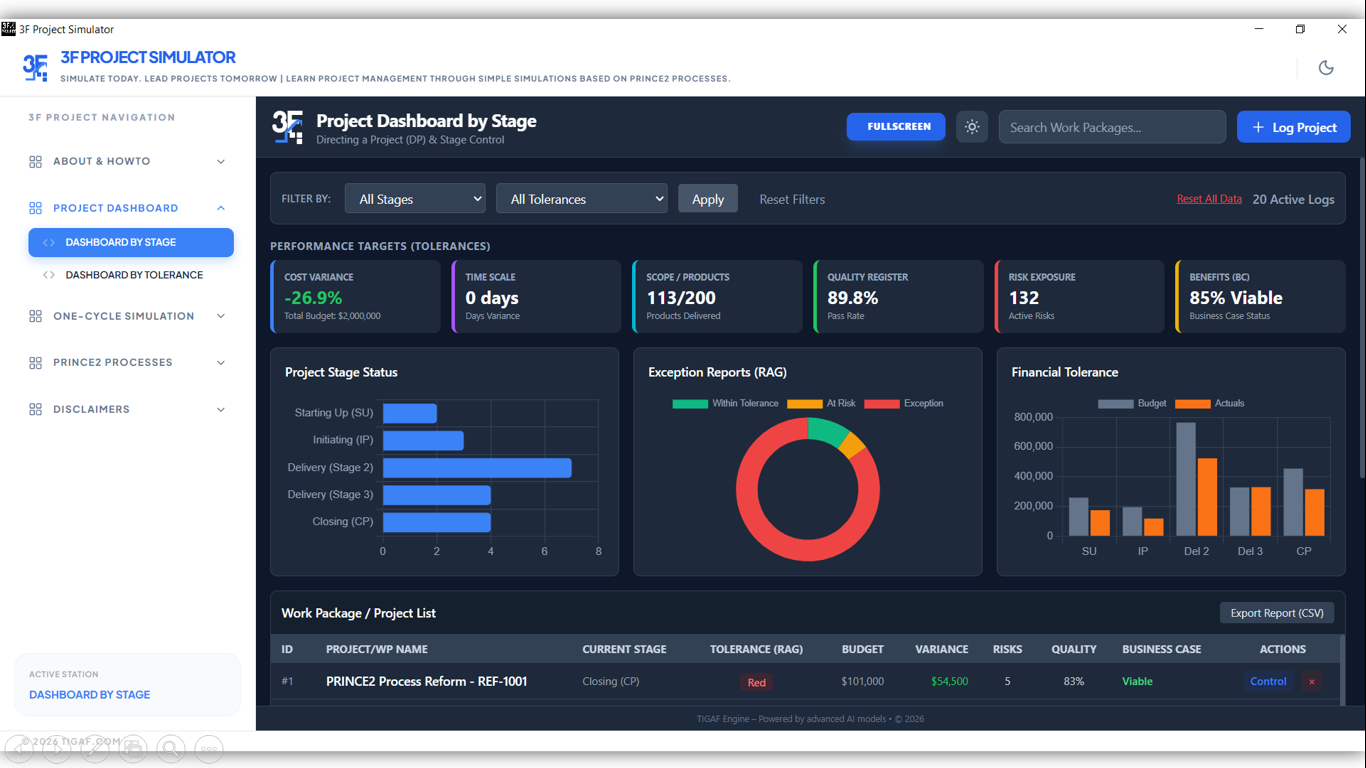
Dashboard by Stage
Displays project management dashboards based on project stages. Users can monitor progress and assess project performance at each active stage.
Dashboard by Tolerance
Displays dashboards based on PRINCE2 tolerances. Users can evaluate the project across the six tolerance dimensions managed by the Project Manager.
Data Storage
All data can be modified by the user. Data is stored locally and visualized dynamically through updated charts and graphs.
One-Cycle Simulation
This module presents a complete project lifecycle managed using the PRINCE2 Framework. It includes seven sample projects.
3.1 Smart City Project
Interactive WorkflowSimulates the management of a smart city project using AI-driven systems for intelligent transportation, implemented through an interactive PRINCE2-based workflow. Users are guided to:
Simulation Steps:
- • 1. Review the layout (current roles, project status, city metrics, and explanatory notes).
- • 2. Click “Initiate Project” to begin.
- • 3. Review process instructions, product management activities, and decision points.
- • 4. Authorize deliverables and proceed through each PRINCE2 process flow step.
- • 5. Switch roles when required to perform reviews and approvals.
- • 6. Continue until the project lifecycle is completed.
3.2 Aviation Project
EXPANSIONSimulates an international airport terminal expansion project using the PRINCE2 Framework. (Similar instruction with Smart City Project.)
3.3 Roadwork Civil/Construction
CIVILSimulates a road construction project with decision points affecting cost. Authorize deliverables, take decision and proceed through each PRINCE2 process flow step. Switch roles when required to perform reviews and approvals. Continue until the project lifecycle is completed.
3.4 Lithium Mining Project
MININGSimulates a lithium mining project with budget-driven decision scenarios. Authorize deliverables, take decision and proceed through each PRINCE2 process flow step. Switch roles when required to perform reviews and approvals. Continue until the project lifecycle is completed.
3.5 Military Project
DEFENSESimulates a confidential military project involving strategic product development. Authorize deliverables, take decision and proceed through each PRINCE2 process flow step. Switch roles when required to perform reviews and approvals. Continue until the project lifecycle is completed.
3.6 ERP Project (ABCXYZ)
TECHSimulates an ERP (ABCXYZ) implementation project within an organization. Authorize deliverables, take decision and proceed through each PRINCE2 process flow step. Switch roles when required to perform reviews and approvals. Continue until the project lifecycle is completed.
3.7 Vaccine Development
MEDICINESimulates a vaccine research and development project aimed at preventing a global pandemic. Authorize deliverables, take decision and proceed through each PRINCE2 process flow step. Switch roles when required to perform reviews and approvals. Continue until the project lifecycle is completed.
PRINCE2 Processes
Starting Up a Project
Interactive simulation of pre-project initiation activities.
Initiating a Project
Interactive simulation of the formal project initiation process.
Managing Stage Boundaries
Simulation of governance and decision-making at each stage boundary.
Controlling a Stage
Simulation of project control activities throughout each stage.
Managing Product Delivery
Simulation of product development and delivery processes.
Closing a Project
Simulation of formal or premature project closure activities.
Directing a Project
Simulation of executive-level direction and decision-making across all stages.
3. Disclaimers
Terms of Usage
Contains usage disclaimers for this software.